|
|
| |
| 안드로이드 웹뷰(Android WebView) 예제 |
|
|
  |
12년 전 |
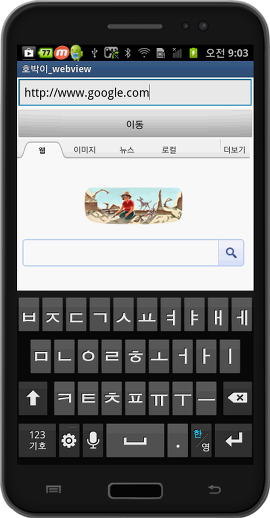
안드로이드 개발 시 많이 사용하는 웹뷰(WebView)예제 소스입니다.
어플에서 고정된 프레임 안에 웹페이지를 띄우는 기능입니다.
MainActivity
package com.example.h5bak_webview;
import android.app.Activity;
import android.os.Bundle;
import android.view.View;
import android.view.View.OnClickListener;
import android.webkit.WebSettings;
import android.webkit.WebView;
import android.webkit.WebViewClient;
import android.widget.EditText;
public class MainActivity extends Activity {
WebView webview;
@Override
protected void onCreate(Bundle savedInstanceState) {
super.onCreate(savedInstanceState);
setContentView(R.layout.activity_main);
webview = (WebView)findViewById(R.id.webview);
webview.setWebViewClient(new WebClient()); // 응룡프로그램에서 직접 url 처리
WebSettings set = webview.getSettings();
set.setJavaScriptEnabled(true);
set.setBuiltInZoomControls(true);
webview.loadUrl("http://www.google.com");
findViewById(R.id.btnStart).setOnClickListener(onclick);
}
OnClickListener onclick =new OnClickListener() {
@Override
public void onClick(View v) {
System.out.println("클릭");
String url= null;
EditText add = (EditText)findViewById(R.id.add);
url = add.getText().toString();
webview.loadUrl(url);
}
};
class WebClient extends WebViewClient {
public boolean shouldOverrideUrlLoading(WebView view, String url) {
view.loadUrl(url);
return true;
}
}
}
activity_main.xml
<!--?xml version="1.0" encoding="utf-8"?-->
<linearlayout android:orientation="vertical" android:layout_height="fill_parent" android:layout_width="fill_parent" xmlns:android="http://schemas.android.com/apk/res/android">
<edittext android:id="@+id/add" android:layout_height="wrap_content" android:layout_width="fill_parent" android:text="http://www.google.com">
<linearlayout android:layout_height="wrap_content" android:layout_width="fill_parent">
<button android:id="@+id/btnStart" android:layout_height="wrap_content" android:layout_width="fill_parent" android:text="이동">
<webview android:id="@+id/webview" android:layout_height="fill_parent" android:layout_width="fill_parent" android:focusableintouchmode="true" android:focusable="true">
</webview></button></linearlayout></edittext></linearlayout>
실행결과
 |
|
 추천 : 1307 추천 : 1307 |
추천
목록
|
|
| |
|